Mixer drawer
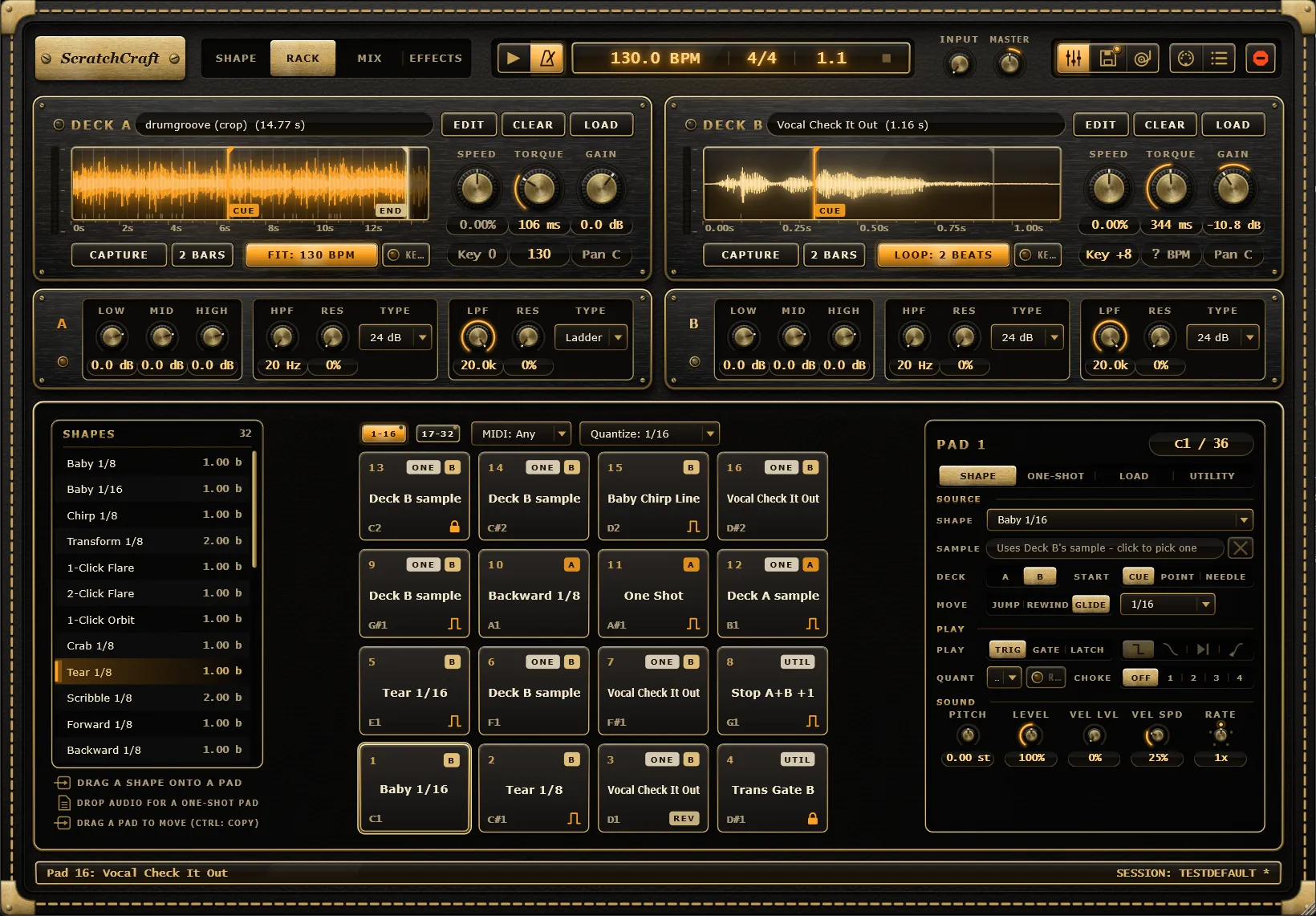
The mixer drawer holds each deck’s tone section: a 3-band DJ EQ with kills, then a highpass and a lowpass filter. Use it the way you would use the EQ and filter knobs on a DJ mixer channel: thin out a beat under a scratch, kill the bass of a sample, or sweep a filter for a build.
Opening the drawer
Section titled “Opening the drawer”The drawer is hidden by default so the main view stays uncluttered. Click Mixer (the faders icon in the header) or press Ctrl+M to show or hide it. It opens as a row under the deck strips, and the window grows by the drawer’s height, so the mode views above keep their size.
Whether the drawer is open is saved with your project.
The controls
Section titled “The controls”There is one strip per deck, labelled A and B. Each strip has three groups of controls, each in its own well.
| Control | Range | Default | What it does |
|---|---|---|---|
| Low | Kill, -40 dB to +6 dB | 0 dB | Cuts or boosts the band below 250 Hz. |
| Mid | Kill, -40 dB to +6 dB | 0 dB | Cuts or boosts the band between 250 Hz and 2.5 kHz. |
| High | Kill, -40 dB to +6 dB | 0 dB | Cuts or boosts the band above 2.5 kHz. |
| HPF | 20 Hz to 20 kHz | 20 Hz (off) | Highpass frequency: removes everything below it. Fully left is off. |
| Res | 0 to 100% | 0% | Highpass resonance: a peak at the cutoff frequency. |
| Type | 12 dB, 24 dB, Ladder | 24 dB | Highpass slope. |
| LPF | 20 Hz to 20 kHz | 20 kHz (off) | Lowpass frequency: removes everything above it. Fully right is off. |
| Res | 0 to 100% | 0% | Lowpass resonance. |
| Type | 12 dB, 24 dB, Ladder | 24 dB | Lowpass slope. |
DJ EQ and kills
Section titled “DJ EQ and kills”The three EQ bands split the deck at 250 Hz and 2.5 kHz. With all three at 0 dB the bands add back up to the original sound. Turn a band fully left and it reads Kill: that band is removed completely, not just turned down. Killing Low on the beat deck is a quick way to make room for a bassy scratch sample.
Filters
Section titled “Filters”The highpass comes first, then the lowpass, and you can use both at once to leave a band in the middle. Res adds a peak at the cutoff, which makes a sweep more vocal. Type chooses the slope:
- 12 dB: a gentle 12 dB-per-octave slope.
- 24 dB: a steeper 24 dB-per-octave slope.
- Ladder: an analog-style 24 dB ladder filter.
Sweeps, kills and type changes are smoothed, so they don’t click, even while the deck is playing.
Where it sits in the signal chain
Section titled “Where it sits in the signal chain”The tone section is applied to the deck’s audio before its gain and the crossfader. Everything that plays on the deck goes through it: Shapes, Freestyle scratching, and one-shot pads that play on deck A or B.
Because it comes before the crossfader, a fader cut silences the filtered sound just as it would the dry deck. The deck’s effect rack comes after the crossfader. The same nine tone controls are also on the Tone faceplate at the top of each rack in the Effects tab.
While all the controls are at their defaults, the tone section is bypassed and leaves the deck’s sound untouched.
Jewel indicators
Section titled “Jewel indicators”A filtered deck never goes unnoticed:
- The jewel under each strip’s deck letter lights while that deck’s EQ or filters are in use.
- While the drawer is closed, the Mixer button shows a jewel if either deck’s tone is in use.
Resetting, MIDI and automation
Section titled “Resetting, MIDI and automation”Double-click a knob to reset it to its default. Every knob and Type menu can be MIDI-learned and automated from your DAW. The settings are also saved in session states as part of each deck.