The Feel window holds the options that decide how ScratchCraft plays: how fast a record brakes, how a platter follows your hand, how tight the crossfader cuts, when the needle goes back to the cue, and more. Start with a preset, then adjust single options by ear.
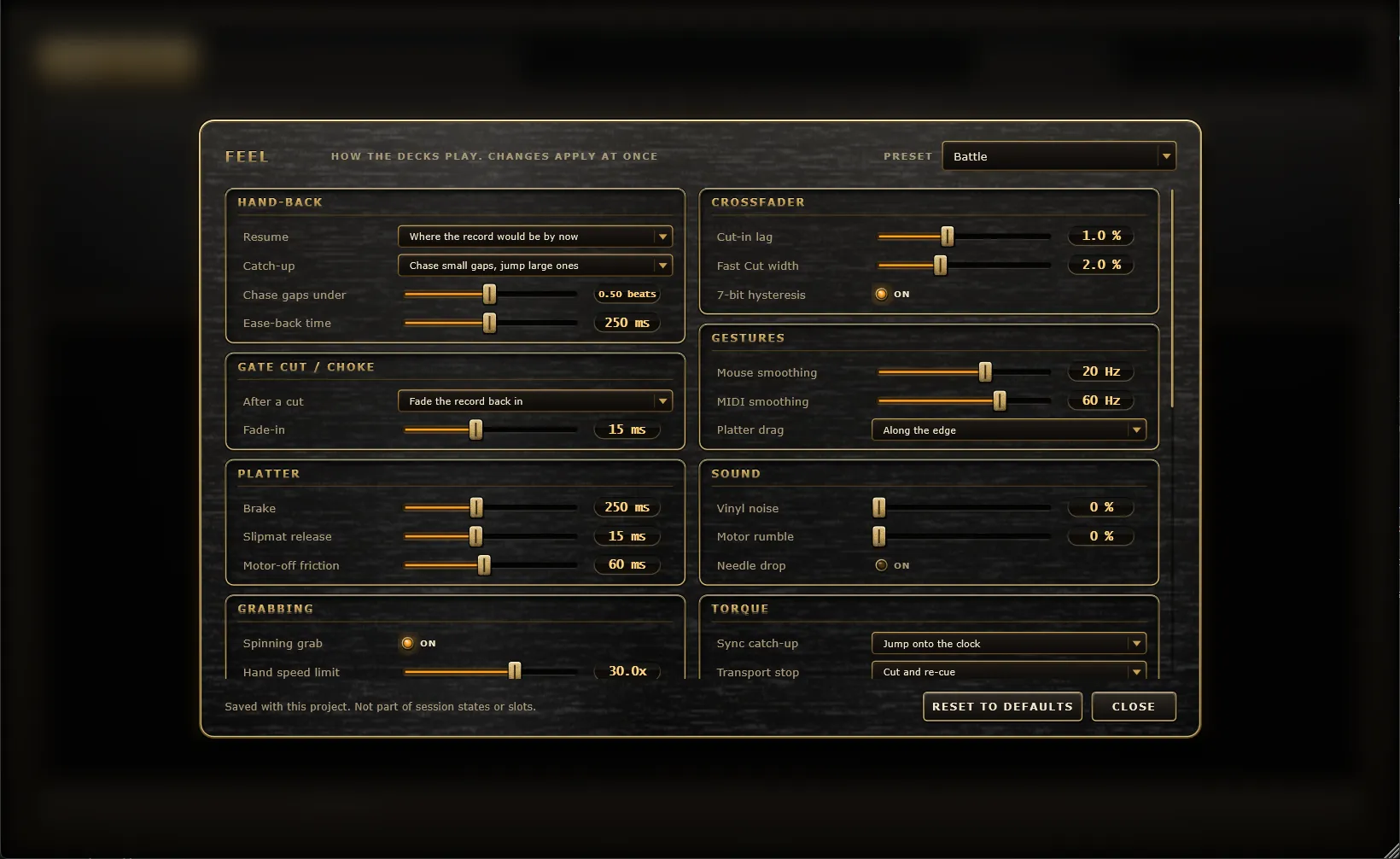
Click Feel in the header (the record-and-tonearm button) to open it. Changes apply at once, even while you play, so you can try an option and hear the difference straight away.
- Hover over any option to see a description.
- Double-click a slider to reset it to its default.
- Reset to defaults puts every option back.
- Close, Esc or clicking outside closes the window.
The window scrolls: the everyday groups come first, followed by more technical “lab” groups further down.
The Preset menu at the top right loads a whole set of options at once.
| Preset |
What it’s like |
| Default |
Every option at its default: the engine as it always played. |
| Recommended |
Torque-driven motor, eased hand-offs, needles that follow edits and the song, a touch of vinyl character and mixer warmth, and the best live stretch. |
| Battle |
Tight and fast: snappy crossfader cuts, a hand that follows closely, a quick slipmat and brighter fast scratches. |
| Vintage vinyl |
A heavy old deck: crackle and rumble, slow brakes and spin-ups, a cartridge that fades at low speed and a warm mixer. |
| Lo-fi grit |
Linear reads with no anti-aliasing, heavy crackle and a hot mixer, for a dirty, aliased scratch. |
| Mixxx-style |
Mixxx’s jog wheel tracking (alpha-beta) and its linear scratch reader. |
| xwax-style |
xwax’s alpha-beta tracking, a raw cubic reader and its fade near standstill. |
| Light CPU |
The cubic reader and fewer one-shot and Keep length voices, for big sessions or slower machines. |
The menu shows the preset your options match exactly, or Custom once any option differs from every preset. Loading a preset keeps your Click options as they are.
When a pad, Shape or Gate lets go of a deck and nothing else is holding the record, the deck is “handed back” to its motor. These options decide where it picks up.
| Option |
Range/choices |
Default |
What it does |
| Resume |
Where the record would be by now, Where the pad left the needle |
Where the record would be by now |
Where the record carries on. The first acts as if the record kept spinning under the pad; the second carries on from the pad’s last needle position. Sync Loop puts a spinning record back in time either way. |
| Catch-up |
Chase small gaps, jump large ones, Always chase, Always jump |
Chase small gaps, jump large ones |
How the record gets back to where it should be: by speeding up or slowing down (a chase, at a speed set by the deck’s torque) or by a click-free jump. Pads with their own sample always jump. |
| Chase gaps under |
0 to 2 beats |
0.5 beats |
With the first Catch-up choice, gaps smaller than this are chased and larger ones jump. |
| Ease-back time |
20 to 2000 ms |
250 ms |
For Gate pads with the Ease back release: how long the record takes to glide back to where the pad started. Short is a quick snap back, long a slow drag. |
What a spinning deck does after a Gate pad’s Cut release or a choke group silences its pad.
| Option |
Range/choices |
Default |
What it does |
| After a cut |
Fade the record back in, Stay silent until played |
Fade the record back in |
Whether the deck’s own record fades back in, or stays silent until a hand, a pad or the motor plays it again. |
| Fade-in |
1 to 500 ms |
30 ms |
How long the record takes to fade back in after a cut. |
| Option |
Range/choices |
Default |
What it does |
| Brake |
20 to 3000 ms |
400 ms |
Record stops and motor off: the time from full speed to a standstill. Motor start uses each deck’s Torque instead. |
| Slipmat release |
1 to 500 ms |
30 ms |
Time for a released record to get back to the motor’s speed. |
| Motor-off friction |
5 to 2000 ms |
80 ms |
Time for a released record to coast to rest while the motor is off. |
| Option |
Range/choices |
Default |
What it does |
| Cut-in lag |
0 to 20 % |
2 % |
Travel from a closed side that stays silent before the sound cuts in. |
| Fast Cut width |
0.5 to 50 % |
5 % |
Travel after the lag over which the Fast Cut curve opens fully. |
| 7-bit hysteresis |
On / off |
On |
A closed side needs one more MIDI step to open than it took to close, so a MIDI fader resting on the edge never flickers. |
| Option |
Range/choices |
Default |
What it does |
| Mouse smoothing |
2 to 60 Hz |
12 Hz |
How closely the record follows the on-screen platter. Lower is smoother, higher is tighter. |
| MIDI smoothing |
2 to 100 Hz |
35 Hz |
How closely the record follows MIDI jog wheels and scratch controls. |
| Platter drag |
Along the edge, By angle |
Along the edge |
How a mouse drag turns the on-screen record. Along the edge counts only movement around the record, and drags near the spindle stay gentle, so they never race or flip. By angle follows the angle around the centre, which gets very sensitive near the spindle. |
| Option |
Range/choices |
Default |
What it does |
| Spinning grab |
On / off |
On |
Grabbing a spinning record lets its momentum settle forward instead of pulling it back. |
| Hand speed limit |
2x to 60x |
20x |
The fastest a hand or a scratch control can move the record, in multiples of normal speed. |
Optional record character, all off by default. See Vinyl character.
| Option |
Range/choices |
Default |
What it does |
| Vinyl noise |
0 to 100 % |
0 % |
Crackle and hiss from the record’s surface. The crackle sits at fixed places in the groove, so scratching back replays it backwards, and a stopped record is quiet. |
| Motor rumble |
0 to 100 % |
0 % |
A low rumble from the turntable while its motor runs. |
| Needle drop |
On / off |
Off |
A soft thump when a new sample lands on a deck (not after a crop or reverse). |
The standalone app’s metronome click. It is added after the master volume, so it never ends up in captures or recorded takes. Presets don’t change these options.
| Option |
Range/choices |
Default |
What it does |
| Click level |
−40 to +6 dB |
0 dB |
How loud the click is. |
| Accent downbeat |
On / off |
On |
The first beat of each bar clicks louder and higher. Off clicks every beat the same. |
| Click on |
Beats, 8th notes, Triplets, 16th notes |
Beats |
How often the click sounds. Clicks between the beats are quieter, so the beat still stands out. |
| Click sound |
Beep, Tick, Low |
Beep |
The click’s voice. Beep is a clear tone; Tick is short and bright and cuts through busy scratches; Low is a softer, woody knock that stays under bright samples. |
How each deck’s Torque knob shapes more than just the spin-up. Every default keeps the plain behaviour.
| Option |
Range/choices |
Default |
What it does |
| Sync catch-up |
Jump onto the clock, Spin up and chase |
Jump onto the clock |
How a Sync Loop deck gets back in time when a hand lets go, its motor starts, Play is pressed or a pad hands it back. Jump puts it there at once, at full speed. Spin up and chase speeds it up with the deck’s torque, catches up with the clock, then locks on. |
| Transport stop |
Cut and re-cue, Wind down |
Cut and re-cue |
What Stop does to the platters (the standalone app’s Stop, and the host’s when Re-cue on Stop includes it). Cut parks them and puts the needles on the cue at once. Wind down brakes them over the Brake time and puts each needle on the cue once its record has stopped, or when Play is pressed. |
| Hand off a Shape |
Jump to the Shape, Ease into the Shape |
Jump to the Shape |
When you let go of a record a Shape or pad is playing: jump straight to the Shape’s position, or ease into it over the deck’s torque time. |
| Slipmat follows torque |
On / off |
Off |
The Slipmat release time scales with each deck’s torque: the set time at 250 ms torque, faster with more, slower with less. |
| Brake follows torque |
On / off |
Off |
The Brake time scales with each deck’s torque in the same way. |
When the needle goes back to the cue point.
| Option |
Range/choices |
Default |
What it does |
| Key keeps needle |
On / off |
On |
Changing a deck’s Key leaves the needle where it is. Off drops it on the cue. |
| Edits keep needle |
On / off |
Off |
Crop, Reverse and their undo leave the needle on the same spot of the record (mirrored by a reverse). Off drops it on the new cue. |
| Cue drag |
Every move, On release, Only when stopped |
Every move |
When dragging the cue marker on the waveform moves the needle: on every move, once when you let go, or only while the record is stopped (a playing record carries on and the next re-cue uses the new cue). MIDI and automation always move the needle. |
| Re-cue on Stop |
Standalone only, Also the host with DAW Sync, Never |
Standalone only |
Which transport’s Stop puts the needles back on the cue, as Transport stop says. With the host and DAW Sync, the host’s Stop also stops pads and Shapes. With Never, the standalone Stop still stops the platters, and the next Play carries on from there. |
| Re-cue on Play |
On / off |
Off |
Starting the standalone transport, or the host’s with DAW Sync on, puts the needles on the cue, so every take starts from the same place. |
| Song jumps |
Ignore, Re-cue, Follow the song |
Ignore |
What a deck without Sync Loop does when the song loops or jumps while playing (the host with DAW Sync, or the standalone transport). Follow the song moves the needle as far as the song moved, so a looped section replays the same part of the record. |
| At the end |
Run out, Loop, Stop on the cue |
Run out |
What a playing record does at its end marker. Run out sits silent in the run-out groove; Loop carries on from the cue at its own speed; Stop on the cue switches the motor off and puts the needle back on the cue. |
| Session recall |
Restart the decks, Changed decks only |
Restart the decks |
What recalling a session state does to the decks. Restart stops both and puts the needles on the cue. Changed decks only keeps the platters running, and only a deck whose sample or cue changed drops its needle. |
The groups below are technical options for comparing ScratchCraft’s engine with others by ear. At their defaults they leave the sound exactly as it is; each one only changes the sound when you move it.
| Option |
Range/choices |
Default |
What it does |
| Fader ramp |
0.2 to 10 ms |
2 ms |
Time a deck’s fader takes between closed and open on a Shape or pad cut. Shorter cuts are snappier and can click; longer ones are softer. |
| Fader curve |
Linear, Equal-power, Exponential (dB) |
Linear |
How a deck’s fader opens along its ramp. Equal-power sounds fuller midway; Exponential opens late, for a softer start to each cut. |
| Crossfader smoothing |
0.2 to 10 ms |
2 ms |
Time the crossfader’s gain takes to follow a move. Shorter is tighter and can click on fast cuts. |
| Option |
Range/choices |
Default |
What it does |
| Hand model |
Spring, Alpha-beta |
Spring |
How the record follows a hand. Spring is a smooth, damped pull set by the smoothing options. Alpha-beta is the tracking filter xwax and Mixxx use for jog wheels and timecode, updated every millisecond. |
| Alpha |
1 to 100 % |
12.5 % |
Shown with Alpha-beta. How much of the position error is corrected each millisecond. Higher follows tighter, lower is looser. |
| Beta |
0.01 to 10 % |
0.39 % |
Shown with Alpha-beta. How much of the speed error is corrected each millisecond. Higher reacts faster but can wobble. |
| Motor curve |
Linear, Exponential |
Linear |
How the motor, slipmat, friction and brake change the record’s speed. Linear is a steady ramp; Exponential is fast at first, then settling, like a real motor. |
How samples are read at any speed. See Vinyl character for more on playback quality.
| Option |
Range/choices |
Default |
What it does |
| Quality |
High (sinc), Standard (cubic), Linear |
High (sinc) |
High keeps highs clean on fast scratches and big pitch changes; Standard is lighter on the CPU; Linear, which Mixxx uses for scratching, adds grit. |
| Anti-aliasing |
On / off |
On |
Filters the sample as a record speeds up, so fast scratches stay clean. Off keeps every high but lets them fold back as aliasing, for a harsher, grittier scratch. |
| Filter onset |
0 to 1 octave |
0 |
Shown while anti-aliasing is on. How far above normal speed the anti-aliasing filter starts: at 0 it starts at normal speed, at 0.5 octave from 1.4x. Higher keeps fast scratches brighter, with a little aliasing. |
| Slow-speed fade |
0x to 0.5x |
0 (off) |
Below this speed the record fades towards silence, like a cartridge that puts out less as the groove slows. Softens direction changes and slow drags. |
| Option |
Range/choices |
Default |
What it does |
| Mixer drive |
0 to 12 dB |
0 (off) |
Soft clipping on the master output, like a hot mixer channel: rounds peaks and thickens the sound. |
| Poly voices |
1 to 32 |
32 |
How many Mono and Poly one-shot sounds can play at once. At 1, a new press takes over the previous one. Idle voices cost no CPU. |
| Keep length voices |
1 to 16 |
16 |
How many of those can change pitch without changing speed at once. A new one past the limit takes the oldest. These cost more CPU than plain playback. |
| Live stretch |
Light, Best |
Light |
The pitch shifter behind Mono and Poly pads’ Speed and Pitch. Light is cheaper and fine for most sounds; Best keeps drums and bass tighter, for about half as much CPU again per voice. Notes already playing fade out when you change it. |