Effects rack
Each deck has its own effect rack: eleven units, from EQ and Drive through modulation effects to Tape Echo and Reverb. The rack sits after the deck’s crossfader, so echo and reverb tails keep ringing after you cut the fader, like an effect on a real mixer channel.
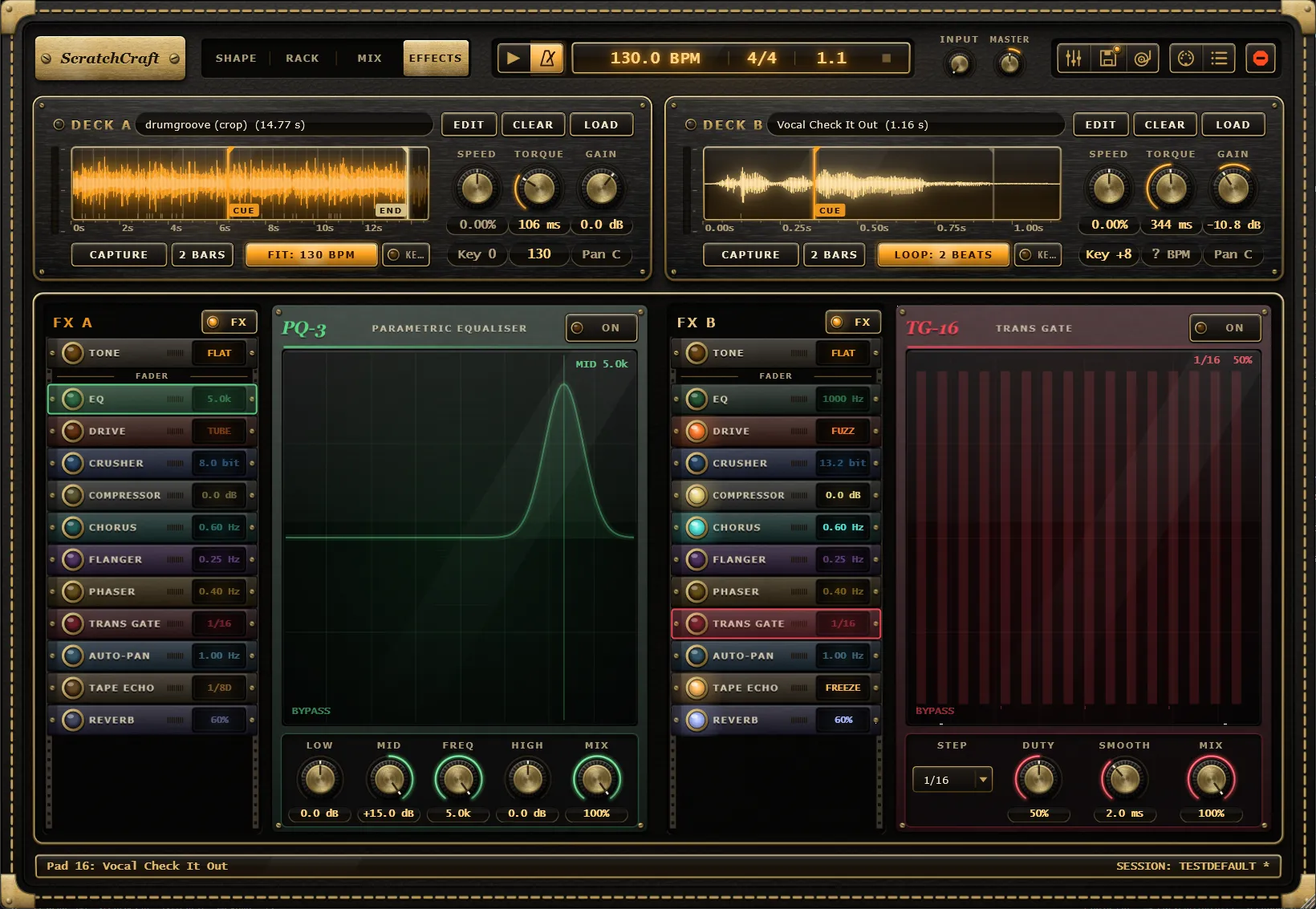
The Effects tab
Section titled “The Effects tab”Switch the header’s mode switch to Effects to edit the racks. The two racks, FX A and FX B, sit side by side under the deck strips. Each rack has:
- A header with the deck’s name and the rack’s FX switch.
- A column of 1U strips, one per unit, in signal order.
- A faceplate below the strips for the unit you have selected.
Every unit is off until you switch it on, so a new rack does nothing to the sound.
Signal order
Section titled “Signal order”The units always run in this order, and they can’t be reordered:
After the rack comes the deck’s Pan.
The Tone strip and the FADER divider
Section titled “The Tone strip and the FADER divider”The top strip, Tone, is not an effect unit. It shows the deck’s tone section from the mixer drawer: the 3-band EQ and the highpass and lowpass filters. Its readout says FLAT while the tone section is untouched and SHAPED once you change it. Select it to edit the same nine controls on the faceplate.
Under the Tone strip is a divider marked FADER. It shows where the deck’s gain and crossfader sit: Tone comes before the fader and every effect unit comes after it. In practice:
- A fader cut silences the deck’s dry sound, but whatever is already in Tape Echo or Reverb keeps ringing out.
- Effects after the fader only hear the deck while its channel is open, so cuts and transforms shape what goes into them.
Strips and faceplates
Section titled “Strips and faceplates”Each strip has an On lamp, a short level meter and a readout of the unit’s main setting, such as the EQ’s mid frequency, the Drive type, or the echo time (FREEZE while the echo is frozen). The Compressor’s readout shows how much it is turning the deck down.
- Click a strip to select it and show it on the faceplate.
- Click a strip’s lamp to switch the unit on or off.
The faceplate has a screen that draws what the unit is doing: EQ curves, the drive curve, the crusher’s staircase, a gain-reduction needle, LFO waves, the gate’s step grid, the pan position, tape reels and repeats, and the reverb’s decay. Below it are the unit’s knobs, menus and switches, its Mix knob, and a power button.
Double-click a knob to reset it. Every strip lamp, knob, menu and switch can be MIDI-learned and automated. The unit you selected on each rack is saved with your project.
On and Mix: insert and send units
Section titled “On and Mix: insert and send units”Every unit has an On switch and a Mix knob, and they work in one of two ways:
- Insert units (EQ through Auto-Pan): Mix crossfades from the dry sound to the effect. At 100% you hear only the effect.
- Send units (Tape Echo and Reverb): the dry sound always passes at full level, and Mix sets how loud the effect is added on top. Switching a send off stops new sound going in, so its tail rings out naturally instead of stopping.
Switching units and turning Mix are smoothed, so they never click.
The rack’s FX switch
Section titled “The rack’s FX switch”The FX switch in each rack’s header turns the whole rack on or off. It is on by default. Switching it off bypasses every unit but leaves each unit’s own switch alone, so switching it back on returns the rack exactly as it was. Use it to compare the deck with and without effects.
Tempo sync
Section titled “Tempo sync”Several units follow the song:
- Flanger, Phaser and Auto-Pan run freely at their Rate, or lock to the song position with Sync (1/4 note up to 8 bars per cycle).
- Trans Gate always steps on the song’s grid.
- Tape Echo sets its time as a note value, or in milliseconds with Free. When you change the time or the tempo changes, the delay glides to the new time like a tape machine, bending the pitch of the repeats on the way.
Stop all and tails
Section titled “Stop all and tails”Stop all (the header’s stop button or a utility pad’s Stop all action) quickly fades every unit back to dry and clears the echo and reverb tails. Loading a session state that includes the effects does the same. Your unit switches stay as they are.
Transport stop, brakes and fader cuts don’t touch the tails.
Effects from pads
Section titled “Effects from pads”Utility pads can drive the racks during a performance:
- FX unit switches a unit on, off, or toggles it.
- FX mix sets a unit’s Mix.
- FX rack switches the deck’s whole rack on, off, or toggles it.
- Echo freeze turns the Tape Echo’s Freeze on, off, or toggles it.
Every effect setting is also saved in session states, and you can load just the effects part of a state.